
Philips HearLink 2
SBO Hearing A/SMedical
4.0703.00 Reviews
- Version
- 1.8.0
- Installs
- 100.00K
- Age Rating
- Everyone
Screenshots
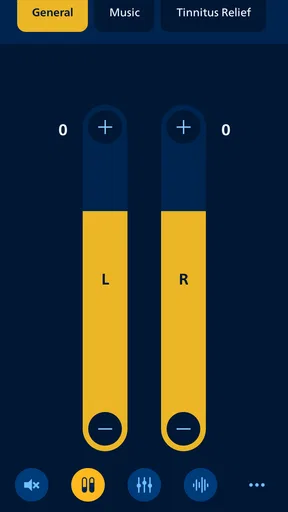
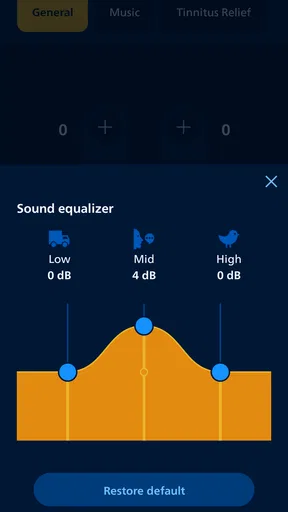
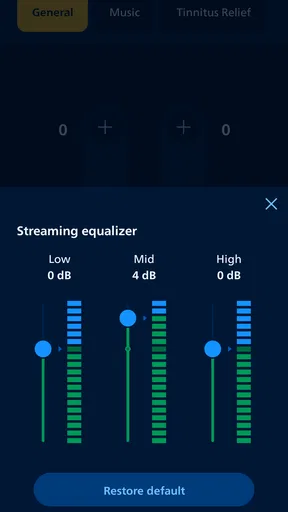
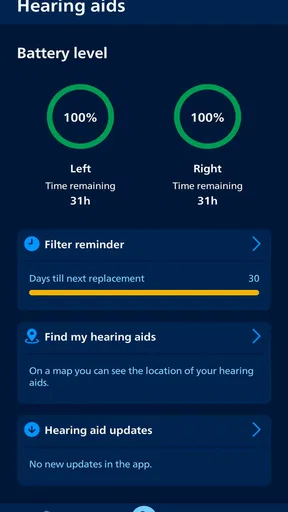
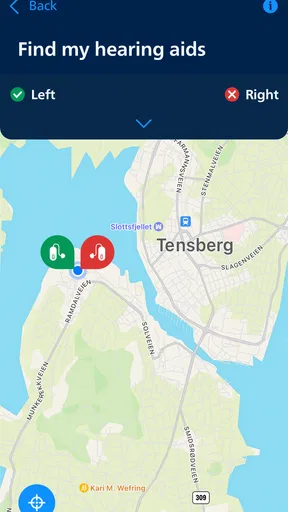
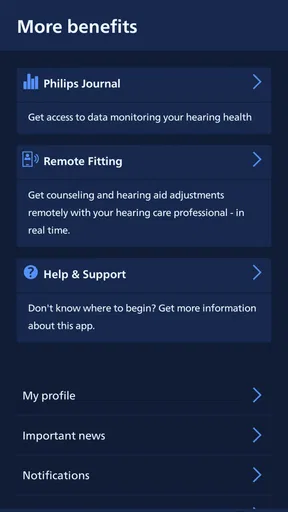
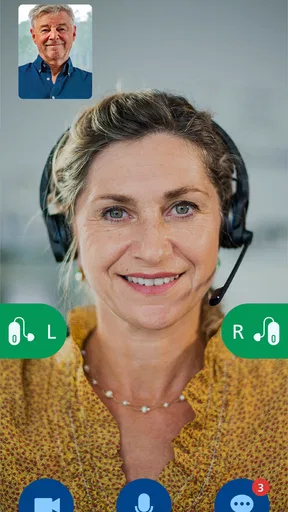
Our Review of Philips HearLink 2
 Analysis by Appyee
I look at hearing-aid companion apps differently from ordinary mobile apps. The important question is not whether the interface looks impressive, but whether it makes small adjustments easier when I am already busy, outside, or trying not to draw attention to myself. Philips HearLink 2 is built for that practical moment: it is a free medical app from SBO Hearing A/S that gives compatible Philips hearing-aid users a way to manage their listening experience from a phone.
After spending time with it, my view is straightforward. This is most appealing when you already use Philips HearLink hearing aids and want a discreet control layer rather than another complicated health dashboard. The app is not a replacement for professional fitting, hearing care, or the hearing aids themselves. Its value comes from making everyday control more convenient.
How I would decide whether Philips HearLink 2 is right for me
My first decision criterion would be compatibility. The app is designed around Philips HearLink devices, so I would not install it expecting a universal controller for hearing aids from different manufacturers. If your hearing aids are not supported, the polished interface will not solve the basic problem. I would check the exact device relationship before changing anything in my routine.
The second criterion is the kind of control I actually need. Some people want to make occasional adjustments without touching the hearing aids. Others want an app to become the main place for settings, listening changes, and device management. Philips HearLink 2 makes more sense for the first group: people who value discreet access and simple interaction, but who still expect their hearing professional to handle the deeper fitting work.
I would also consider how I use my phone during the day. If I regularly carry it, the app can put control within reach. That sounds minor, but it matters in situations where taking out a hearing aid, pressing a small button, or asking someone for help would be awkward. On the other hand, someone who rarely carries a phone may gain less from a phone-based companion.
The app is listed for Everyone, which fits its role as an accessibility-oriented control tool rather than a social or entertainment product. It is free to use, and its current version is 1.8.0. Those details lower the barrier to trying it, although the real investment remains the compatible hearing hardware and the effort of setting up a comfortable routine.
What the first setup feels like in real life
I would approach setup patiently rather than treating it like installing a normal utility. A hearing-aid app needs to communicate with personal hardware, and the result depends on the phone, the hearing aids, and the connection between them. I would make sure both hearing aids are ready, keep the phone close, and avoid doing the first pairing while rushing out of the house.
One useful habit is to test the app in a quiet room before relying on it in public. That gives me a chance to see which controls are easy to find and whether the hearing aids respond as expected. I would then try the same routine in a busier place, because a control that feels obvious at home may be harder to use when I am concentrating on a conversation.
I would also keep the phone’s normal connection settings in mind. If the app stops behaving as expected, I would first check whether the hearing aids are powered, nearby, and still connected before assuming there is a serious fault. This simple troubleshooting order avoids unnecessary reinstallation and is especially useful for someone who is not comfortable with technology.
The everyday scenario where it earns its place
Imagine I am sitting in a café with a friend. The room is louder than expected, and I want to make a quick change without interrupting the conversation or handling the hearing aids directly. Reaching for the phone, opening the companion app, and making the adjustment is more discreet than explaining what I need to do. The benefit is not flashy; it is the reduced social friction.
A similar situation can happen at home when the television is on and another person is speaking nearby. Instead of treating the hearing aids as something I must physically manage every time the environment changes, I can use the phone as an easier control point. That can make experimentation less intimidating, especially for a new wearer who is still learning what feels comfortable.
There is a trade-off, though. The phone becomes part of the chain. If it is in another room, out of battery, or being used for something else, the convenience disappears. I would therefore treat the app as an additional control method, not as the only way I can manage my hearing aids.
Where the app wins over ordinary alternatives
The strongest advantage is discretion. Physical controls on hearing aids can be useful, but they may be small, difficult to reach, or awkward to operate while talking to someone. A phone screen is familiar and visible, and I can make a change without drawing attention to my ears. For many users, that is a more meaningful benefit than a long list of technical options.
It also fits the way people already use smartphones as personal control centers. I am more likely to remember how to interact with a familiar touch interface than to remember the exact button sequence on a small device. That matters for occasional users who do not want to memorize controls or carry extra accessories.
Another strength is focus. Philips HearLink 2 is not trying to be a broad medical journal, a hearing diary, or a social platform. Its purpose is narrower: help control compatible hearing aids. In my experience, that kind of focus can be reassuring. There are fewer unrelated screens competing for attention, and the app’s role is easier to explain to a family member or caregiver.
The adoption figures also suggest that it is not an obscure experiment. It has passed one hundred thousand installs and holds a four-point-zero average from around four thousand three hundred ratings. I would not treat those numbers as proof that it will suit every person, but they do indicate that the app has reached a meaningful group of users and has received enough feedback to establish a general reputation.
Small workflow improvements that make a difference
My first practical tip would be to create a repeatable “before leaving home” check. I would open the app, confirm that the hearing aids are responding, and then put the phone somewhere accessible. This is less about checking every setting and more about avoiding the frustrating discovery that the connection is not ready when I am already outdoors.
My second tip is to use the app as a learning aid during the first weeks of wearing the hearing aids. Rather than changing several things at once, I would make one adjustment, listen for a while, and note whether it helped in that particular environment. That approach makes it easier to understand personal preferences and prevents random changes from becoming confusing.
My third tip is to think in terms of situations, not permanent “best” settings. A setting that feels comfortable in a quiet kitchen may not be ideal in a restaurant or on a walk. The app is most useful when I see it as a quick way to respond to the environment, not as a one-time setup that eliminates all future adjustments.
I would also show the basic workflow to someone I trust. A partner, adult child, or caregiver may be able to help if the connection needs attention later. This is particularly helpful for users who find smartphone menus tiring. The goal is not to hand over control, but to make the routine less stressful when something unexpected happens.
Where another category may fit better
Philips HearLink 2 is not the best choice for someone looking for a hearing assessment tool. An app cannot replace a hearing test, professional advice, or the fitting process that determines how hearing aids should support an individual. If my main concern were understanding a change in hearing ability, I would look toward a qualified hearing professional rather than relying on a control app.
It may also be the wrong choice for someone who wants one application to manage hearing aids from several brands. Manufacturer-specific apps are usually strongest when paired with their own ecosystem, but that specialization limits their usefulness outside it. A person who changes brands often or helps several relatives with different devices may prefer a broader support arrangement, even if it offers less tailored control.
Some users may prefer a physical remote or direct controls because they do not want to depend on a smartphone. That alternative can be better for someone with limited phone confidence, a small or unreliable phone, or a daily routine where carrying a handset is inconvenient. Philips HearLink 2 wins on discretion and familiarity, but physical controls win when independence from the phone matters more.
I would also be cautious if my expectations are too high. The app can make control more convenient, but convenience is not the same as improved hearing in every environment. If a hearing aid needs professional adjustment, repeatedly changing app controls may only mask the underlying issue. In that situation, booking a hearing-care appointment is a better next step than experimenting endlessly.
The cost of switching to an app-based routine
Because the application itself is free, the cost is mainly practical rather than financial. I would need to spend time pairing the devices, learning the controls, and building confidence that the connection will behave when I need it. For a technically comfortable user, that learning curve may be short. For someone who dislikes phone settings, it may feel like a real commitment.
There is also a dependency cost. Once I become accustomed to using the phone for discreet adjustments, I may feel less prepared when the phone is unavailable. I would keep the basic physical controls familiar and avoid putting the phone in a distant room when I expect to need the hearing aids. That small precaution protects the convenience from becoming a weakness.
Switching from another companion app can involve a different kind of friction: changing habits. Even if the general idea is familiar, the location and wording of controls may not match what I already know. I would give myself several days to judge the workflow instead of deciding after one rushed attempt. Hearing-related controls deserve a calm test because comfort and confidence matter more than novelty.
The app was released on January 17, 2023, and its current version is 1.8.0. It supports Android 8.0 and later, so I would check the phone’s operating-system version before planning around it. That is a simple step, but it prevents an avoidable surprise during setup, especially when the app is being installed on an older spare phone.
Privacy, confidence, and daily independence
For a medical-category app, I would pay attention to how comfortable I feel using it around personal hearing equipment. I would keep the phone protected with its normal security settings and avoid handing it to someone casually just because they want to “see the app.” The important point is that hearing control is personal, and the phone should remain under the user’s control.
I would also judge the app by how much independence it gives me. A good companion app should reduce the number of times I need assistance for small adjustments, not make me feel that I need a technical helper for every connection issue. Philips HearLink 2 has the potential to support that independence when the user is willing to learn a simple routine and the hearing aids are already properly fitted.
For a caregiver, the app can be useful as a shared learning point, but I would be careful not to let the caregiver become the permanent operator. The wearer should understand the everyday controls as much as possible. That preserves confidence and makes the app worthwhile even when family support is not immediately available.
My recommendation for different kinds of users
I would recommend Philips HearLink 2 to a Philips HearLink owner who carries an Android phone running a supported system and wants a discreet way to interact with compatible hearing aids. It is especially appealing for people who dislike fiddling with small controls, regularly move between quiet and noisy places, or want to make adjustments without interrupting a conversation.
I would recommend it more cautiously to a first-time hearing-aid user. The app can make the device feel less intimidating, but I would not use it as a substitute for learning from a hearing professional. The best experience comes when the underlying fitting is right and the app is used for convenient day-to-day control.
I would skip it if I do not use compatible Philips hearing aids, rarely carry a phone, or want a universal tool for multiple brands. In those cases, a physical remote, direct device controls, or another manufacturer’s companion app may fit the routine better. The right choice depends less on the app’s download price than on whether its control method matches real life.
My final opinion is positive but deliberately practical. The real benefit is discreet control that supports everyday confidence, not a promise to solve every hearing problem. SBO Hearing A/S has kept the product focused on the relationship between a phone and Philips hearing aids, and that focus is exactly why it can be useful. If that relationship matches your equipment and habits, Philips HearLink 2 is worth trying as a convenient part of your routine. If it does not, no amount of app familiarity will make it the right tool.
Verdict
Strengths of Philips HearLink 2
- Personalized hearing settings can improve speech clarity in daily conversations.
- Remote control makes volume and program changes discreet and convenient.
- Bluetooth connectivity supports calls, music, and other audio on compatible devices.
- The app helps monitor battery status and hearing-aid connection at a glance.
- Adjustments can be made without visiting a hearing-care professional every time.
Limitations of Philips HearLink 2
- Some features may require compatible Philips hearing aids and newer smartphones.
- Bluetooth pairing can occasionally be confusing during initial setup.
- Battery information may not update instantly after reconnecting the hearing aids.
- Advanced adjustments still require assistance from a hearing-care professional.
- App performance and available features can vary by hearing-aid model and region.
Similar Picks in This Category
View All
WebMD: Symptom Checker
WebMD, LLC4.1

Microphone Amplifier
DOSA Apps4.2

Anatomy Learning - 3D Anatomy
3D Medical OU4.5

Period Tracker and Calendar
SimpleInnovation4.9

GoodRx: Prescription Coupons
GoodRx4.8

CVS Health
CVS Pharmacy4.5
Frequently Asked Questions
What is Philips HearLink 2, and what can I use it for?
Philips HearLink 2 is a companion app for compatible Philips HearLink hearing aids. After pairing your hearing aids, you can use the app to adjust volume, change listening programs, check battery information, and manage selected hearing-aid settings from your smartphone. It is designed to make everyday control more convenient, although the features available can vary depending on your hearing-aid model, firmware, phone, and region.
Which phones and hearing aids are compatible with Philips HearLink 2?
Compatibility depends on the specific Philips HearLink hearing-aid model and your smartphone’s operating system. Before downloading, check the app listing and Philips’ official compatibility information to confirm that your device is supported. Some functions may require Bluetooth Low Energy, a newer operating-system version, or particular phone settings. Even when pairing works, advanced features such as streaming or remote support may not be available on every phone.
How do I connect my Philips HearLink hearing aids to the app?
Install Philips HearLink 2, enable Bluetooth, and follow the in-app pairing instructions. In many cases, the hearing aids need to be restarted or placed near the phone so they can be detected correctly. Grant the permissions requested by the app, especially Bluetooth-related access. If connection problems occur, close other hearing-aid apps, restart Bluetooth, keep both devices charged, and consult the official Philips support instructions for your model.
Can Philips HearLink 2 replace an audiologist or hearing-care professional?
No. Philips HearLink 2 is intended as a control and support tool, not as a replacement for professional hearing care. You may be able to make everyday adjustments, but fitting, programming, hearing tests, and troubleshooting medical or hearing-related concerns should be handled by a qualified hearing-care professional. If your hearing changes suddenly, the aids become uncomfortable, or performance declines, arrange a professional evaluation instead of relying only on app settings.
Does Philips HearLink 2 require an internet connection, and is it free to download?
The app is generally available to download without a separate purchase, but availability and any optional services can differ by country or platform. Basic controls may work through the phone’s Bluetooth connection without continuous internet access, while features such as remote assistance, updates, account services, or support content may require internet access. Mobile-data usage, permissions, and privacy options should be reviewed before enabling connected features.
